> For the complete documentation index, see [llms.txt](https://zerodensitydocumentation.gitbook.io/docs/llms.txt). Markdown versions of documentation pages are available by appending `.md` to page URLs; this page is available as [Markdown](https://zerodensitydocumentation.gitbook.io/docs/reality-5.3-sp3/reality-5.3-sp3/user-guide/user-management/advanced-user-management/user-management-ui.md).
# User Management UI
User Management UI
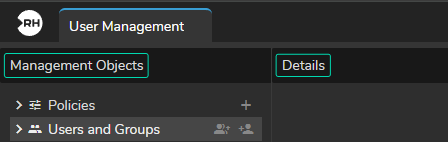
User Management has two main sections, as shown in the image above:
* **Management Objects**: It is the section where you can govern (Add, Delete, Configure) Policies and Users.
* **Details**: It is the section where you specify the details of your Policies and Users.
{% hint style="info" %}
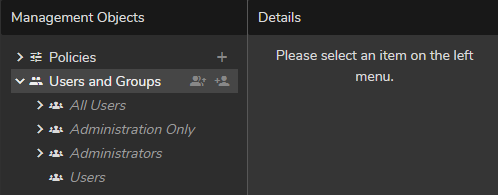
Read-only items inside the User Management Module are shown in dimmed *italic* text.
{% endhint %}
### Policies
In RealityHub terminology, Policy refers to the set of rules under which module/user feature is accessible. The policies menu allows you to add new policies or edit & delete existing policies.
{% hint style="info" %}
Each user group can have one or more policies assigned.
{% endhint %}
Policies
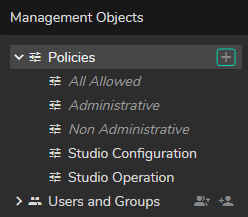
The **Policies** section has three read-only example templates:
* **All Allowed**: A read-only policy that allows access to all current and forthcoming user features/modules.
* **Administrative**: A read-only policy that allows access only to the **User Management** and **Configuration** modules.
* **Non-Administrative**: A read-only policy that allows access to all current and forthcoming user features except for the **User Management** and **Configuration** modules.
* **Studio Configuration**: Editable example policy. This policy allows you to access **Playout**, **Launcher**, **Nodegraph Editor**, **Form Builder**, **Action Timeline Editor**, and **Cook Manager**.
* **Studio Operation**: Editable example policy. This policy allows access to the **Playout** and **Launcher** modules.
### Users and Groups
Users and Groups is the section where the admin or other administrators can **create**, **edit**, and **delete** users or user groups. Assigning users to groups and reserving licenses also occur inside the **Users and Groups** section.
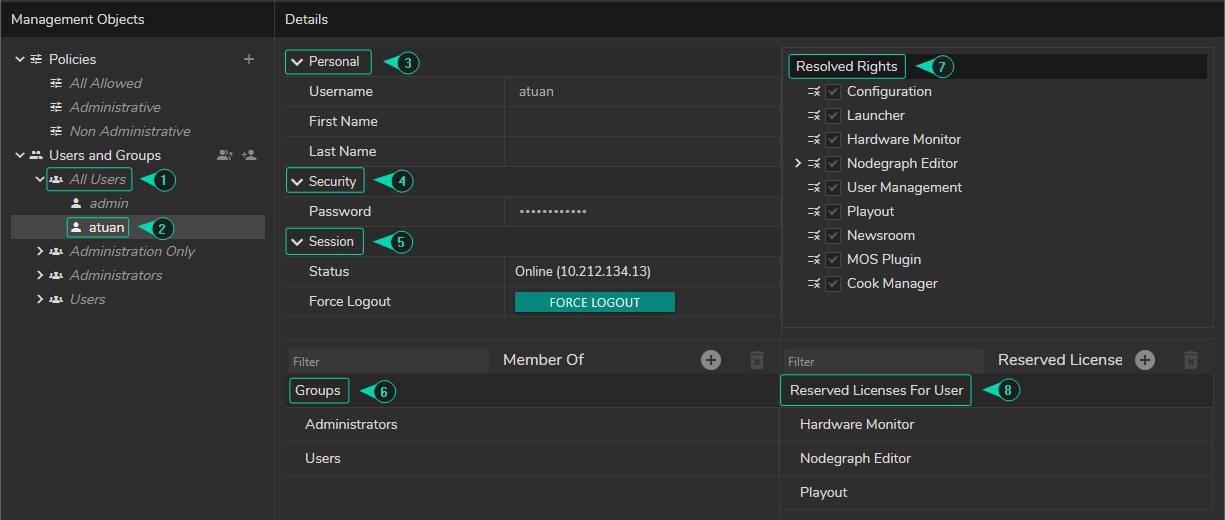
1. **User Group**: Set of RealityHub users with the same preferences.
2. **User**: A person who utilizes one or more RealityHub features.
3. **Personal Details**: You can **view** and **change** the details, such as the Username, First Name, and Last Name.
4. **Security**: User passwords can be defined in the security section.
5. **Session**: Shows the user status and IP Address
6. **Group** Assignment (Member Of): You can list, search, add, and delete users to Groups via this section.
7. **Resolved Policy**: It is the place where you view a Resolved Policy assigned to the selected user.
8. **Reserved Licenses**: You can reserve licensed feature(s) for a user through this unit.