# AJA Configuration

Before you begin to install and configure AJA drivers and firmware, make sure that you uninstalled all AJA related entities because **this process requires clean installation**.

* **Supported Driver Version**: 16.2.4.6
* **Firmware Date**: 2021/09/16 14:33:45

<table><thead><tr><th width="202.48556901450576">Card Variant</th><th>Firmware Name</th></tr></thead><tbody><tr><td>Corvid44 12G BNC</td><td>c44_12g_8k_tprom_2021-12-19.bit</td></tr><tr><td>Corvid 44 BNC</td><td>corvid_44_2021-09-16.bit</td></tr><tr><td>Corvid88</td><td>corvid_88_2021-11-30.bit</td></tr></tbody></table>

{% hint style="info" %}
The following guide will utilize a configuration method for AJA Corvid 44 BNC card, but it is also applicable to other certified AJA drivers.&#x20;
{% endhint %}

### Preparations&#x20;

<div align="left"><figure><img src="https://content.gitbook.com/content/F00UfwVmrAMlFEsYUV8N/blobs/GyU73iq4jTsMLwz2GZWH/image.png" alt=""><figcaption><p>Windows Start Menu</p></figcaption></figure></div>

* Click on the Windows **Start** button, find the **Add or remove programs** and run it.

<div align="left"><figure><img src="https://content.gitbook.com/content/F00UfwVmrAMlFEsYUV8N/blobs/gtdRr9vF0T4H9y8uGWQF/image.png" alt=""><figcaption><p>Apps &#x26; Features</p></figcaption></figure></div>

* Type AJA in the search box, uninstall anything related to AJA.

<div align="left"><figure><img src="https://content.gitbook.com/content/F00UfwVmrAMlFEsYUV8N/blobs/LxCP67bH0TKmHtD3O5IP/image.png" alt=""><figcaption><p>Computer Management</p></figcaption></figure></div>

* Click on the Windows **Start** button, find the **Computer Management** and run it.

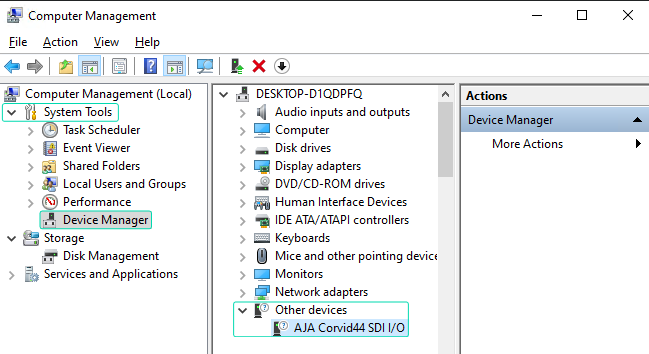
<div align="left"><figure><img src="https://content.gitbook.com/content/F00UfwVmrAMlFEsYUV8N/blobs/LorPWv5iLAPO2TFeNkSj/image.png" alt=""><figcaption><p>Computer Management</p></figcaption></figure></div>

* Go to System Tools > Device Manager > Other Devices and check if your AJA Device is present.

### Installations

In this stage you have to conduct following operations:&#x20;

* AJA Driver Installation
* AJA Firmware Check
* AJA Firmware Update (Optional)

#### AJA Driver Installation

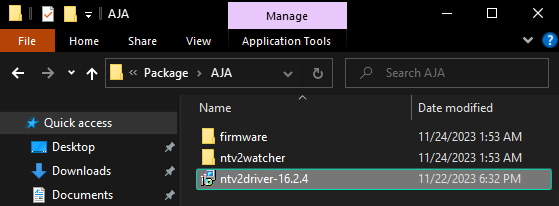
<div align="left"><figure><img src="https://content.gitbook.com/content/F00UfwVmrAMlFEsYUV8N/blobs/w0NojXglMlkFZrsGfJWZ/image.png" alt=""><figcaption><p>Reality 5.3 Folder</p></figcaption></figure></div>

* Enter the Reality 5.4 SP1 Setup Folder.&#x20;
* Go to Package > AJA > and click on the **ntv2driver-16.2.4** installer package.

{% hint style="info" %}
The AJA Driver Installation will be carried out silently, and no warning messages will be displayed.
{% endhint %}

#### AJA Firmware Check

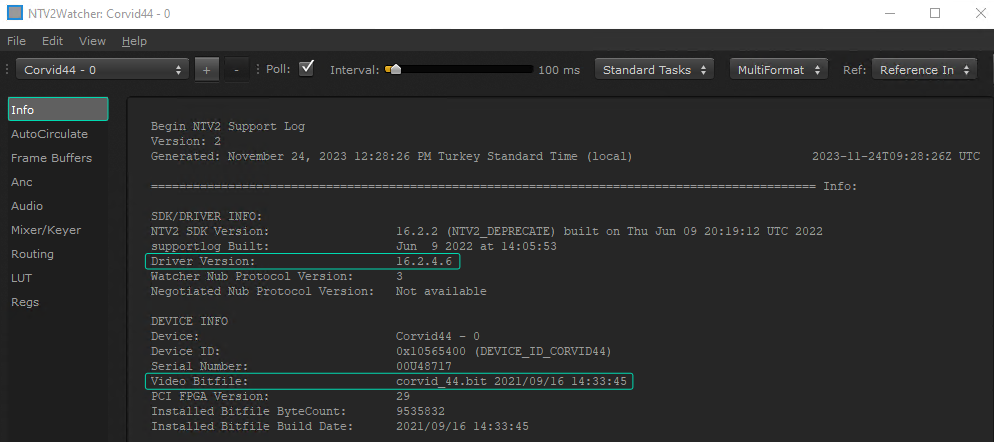
<figure><img src="https://content.gitbook.com/content/F00UfwVmrAMlFEsYUV8N/blobs/MHkRevd9re3UncEoXoY7/image.png" alt=""><figcaption><p>NTV2Watcher</p></figcaption></figure>

* Go to Setup-Reality-5.3.b447 > Package > AJA> ntv2watcher folder.
* Double click on the ntv2watcher.exe
* Click on the Info and check the Driver Version and Video Bitfile

If the Firmware (Video Bitfile) is not matching, proceed with AJA Firmware Update.

#### AJA Firmware Update

If your AJA Firmware (Video Bitfile) is not matching with your AJA Driver, then you have to update your firmware. To do that:

<div align="left"><figure><img src="https://content.gitbook.com/content/F00UfwVmrAMlFEsYUV8N/blobs/jUxJWmUc2NbRa2UaG7Cv/image.png" alt=""><figcaption><p>Running Shell Command</p></figcaption></figure></div>

* Navigate to Setup-Reality-5.3.bXXX > Package > AJA > firmware folder.
* Launch your preferred command shell within the AJA folder, as demonstrated above.

<div align="left"><figure><img src="https://content.gitbook.com/content/F00UfwVmrAMlFEsYUV8N/blobs/EnEhU80vlxRIXz79DNbN/image.png" alt=""><figcaption><p>Running Firmware Update Command</p></figcaption></figure></div>

* Type the following command as illustrated above and hit enter on your keyboard:&#x20;

<pre class="language-shell" data-title="Shall Command" data-full-width="false"><code class="lang-shell"><strong>.\ntv2firmwareinstaller -p corvid_44_2021-09-16.bit
</strong></code></pre>

<div align="left"><figure><img src="https://content.gitbook.com/content/F00UfwVmrAMlFEsYUV8N/blobs/RFyiMpSU9Q6pCwfKDrpJ/image.png" alt=""><figcaption><p>Firmware Update Process</p></figcaption></figure></div>

Firmware update is done.

* Restart the computer.