
Frequently Asked Questions
What is Processing Node?
Processing nodes are special nodes serves as a functional unit responsible for processing data and performing operations on input values to generate desired outputs. To set an example, UE5 node is a processing node.
I received TPM License error. How to fix it?
In such a scenario, please follow the instructions:
Request a new Activation file from Zero Density licensing department.
Go to Start > Run > type msconfig.
Click on the Hide all Microsoft services checkbox.
Click on the Disable all button.
Click Apply, then OK.
Reboot the computer.
Go to Start > Run > type msconfig.
Click on the Enable all button.
Click Apply, then OK.
Reboot the computer.
Uninstall the license tool.
Delete the entire folder C:\ProgramData\Zero Density\Licensing.
Reboot the machine.
Re-install the license manager.
Activate the freshly requested licenses.
There is a sphere mesh in VR Set origin. How do I remove it?

Right click inside the Content Browser and select the Blueprint Class.

Pick the Game Mode Base as a Parent Class.

Create a Pawn with the same method.

We created a Game Mode and Pawn, as illustrated above. Now:
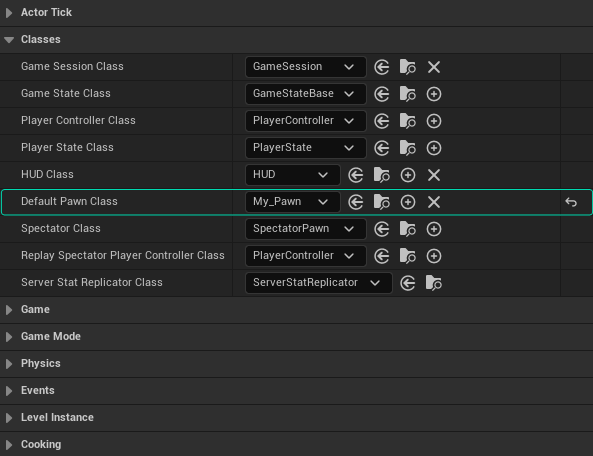
Change the Default Pawn Class property to Pawn.

Click on Compile, and then to Save buttons.

Go to Project Settings, click on the Maps & Modes.

Change the Default Game Mode property to the one you've created.
Save your Project.
I can't navigate inside the Reality Editor Viewport properly; mouse is not responding Pan and Tilt operations.
Reality Editor Viewport has two modes. To utilize traditional Reality Editor viewport mode, you have to enter the following console command in the Reality Editor:
reality.viewport.mode 2Details:
reality.viewport.mode - defines what should be displayed on viewport. Currently available options are
0 = nothing
1 = reality camera preview
2 = game render
Is it possible to play an image sequence with the Read Video node?
Currently image sequences such as PNG, TARGA or EXR are not supported with ReadVideo node. On the other hand, video formats that support alpha channel can played correctly via ReadVideo node.
Why my version number is red?
When the frontend version differs from the backend version, version number turns red color. In such a scenario we recommend you update Reality Loader and refresh the Reality Hub UI.
Where do I download Reality Loader?
Reality Loader is embedded into Reality Hub. To download it:
Login to Reality Hub UI, go to Main Menu > Configuration
On the left menu, select General > Configuration
Go to Maintenance > Reality Loader and click on the Download
Also visit: Reality Loader
Is it essential to keep Reality Hub and Reality Loader versions the same?
Yes. It doesn’t matter if you upgraded or downgraded Reality Hub; it is essential to keep Reality Hub and Reality Loader versions the same.
I can’t access the Nodegraph menu and receive a warning: “Engine must be running and fully loaded.”
If you receive such a warning, check if the Reality Loader is running.
Can I reach my Projects and Assets if they are on a different server?
You can keep projects and assets on different servers if your system meets the recommended system requirements.
You may also want to check the Shared DDC workflow.
How can I list the Project cache?
Go to the General Setting and activate the Configuration module
Click on Engines > Hosts
In the right panel, there is a Cache tab. You can list & delete your cached project in this section.
What is Reality Hub Community Edition?
Community Edition is a free-to-download version of Reality Hub that can be utilized by students, artists, and developers to create personal projects.
See also https://youtu.be/jN_614OjuK0?t=3
Which features are available with the Community Edition?
Modules like Nodegraph Editor, Playout, Launcher, Form Builder, and Action Timeline Editor are available along with the Advanced Preview Monitor.
Community Edition works only with a single Local Engine.
Can I upgrade my Community Edition?
It is possible to upgrade the Community Edition without uninstalling/reinstalling the current version. Zero Density Licensing Team will issue your licenses when the license purchase procedure is successfully finished.
For any inquiries, please get in touch with the Licensing Team via licensing@zerodensity.tv
Is Community Edition license time-bound?
Yes. When the Community Edition expires, either you have to upgrade the version or create a request to license it.
Can I use different browsers to reach the same Reality Hub Server?
You can use any of the supported browsers of your choice harmoniously.
Which Engines are supported by Reality Hub 1.5?
RealityHub 1.5 supports the following Engines:
Reality Engine 4.27 & 5.3.SP2
Unreal Engine 5.x
I defined the Shared Folder Path, Username, and Password, but I can’t reach my project, and ReScan operation fails.
Check if the folder structure or folder name has changed.
If the abovementioned step does not help:
Check if your Windows username is under a corporate domain. Example: CORP\name.surname
If it doesn’t help:
Check if you have administrative privileges to reach your shared folder.
What is the meaning of the “Please match the requested format” when I try to add New Shared Folder?
For a Shared Folder, only the UNC Path is supported. If you try to add a Local Path name, you will be asked to write the requested format.
UNC Path Example: \\127.0.0.1\RealityWorkspace\Reality\Assets
Local Path Example: C:\RealityWorkspace\Reality\Assets
Can I install different applications on the Reality Hub Server?
We strongly advise you not to install any application on the Reality Hub server; it might cause substantial problems.
To set an example, the application you installed might try to use one of the Ports dedicated to Reality Hub and disrupt your communication with your production pipeline. It is untested, uncertified, and inadvisable.
I can’t see my project in the Launcher.
In such cases, you need to scan the folder where you keep your Projects by using the Scan Folder tool.
Is it possible to grant single module access to a specific user or user group?
With the Advanced User Management module, you can restrict/grant access to different modules/features.
I upgraded the Reality Hub from 1.1.x to 1.5, and now I can’t reach any module except for User Management and Configuration modules.
With version 1.3, we introduced a new module for user management. The new User Management Module offers two different models: Advanced User Management and Basic User Management. We advise you to create an administrator account and leave the admin for only essential administrative purposes.
For more information, please visit User Management
I can’t access a specific module, like Nodegraph/Actions.
If your company uses Advanced User Management, contact your system admin if your Policy allows you to use a specific module.
Check if the License is reserved for other users. See License Reservation
If you meet the above requirements, refresh the page.
If it doesn’t help, restart the Reality Hub Service.
If the abovementioned steps don’t help, please get in touch with our Support Department.
Can I reach Reality Hub Server via a supported browser but from different operating systems like Ubuntu or macOS?
You can control your Reality Hub from a supported browser if your operating system fully supports the requirements.
Can I install Reality Hub Server on Ubuntu or macOS?
Reality Hub Server can only be installed on Microsoft Windows based OS. Please visit System Requirements
I received a “Couldn’t connect to WebSocket server” error.
Contact your IT if:
Your network is working properly.
The corporate network has a different problem.
The servers are upgraded.
If it doesn't help:
Refresh the page and try to re-login
If you can't obtain a viable result:
Check if the Reality Hub admin has logged you out from the system via Force Logout. See also User Management
If you can't find your solution in the abovementioned steps, please contact our Support Department
Can antivirus software affect Reality Hub?
We do strongly recommend you give full exception to Reality Hub independently of your security toolset.
Would it be a problem if I used the certified Microsoft Windows version with a different language pack?
For Reality Hub Server, only English (United States) is tested and certified. Using other languages may negatively affect the functionality of the Reality Hub Server side.
What is the meaning of "RGraph history is not tracked in live mode"
When your Launch Configuration is set to Live, RGraph history entries are not tracked. To activate the RGraph History, make sure that you change the Launch Mode from Live to Configuration.
Does Reality Hub support undo action via CTRL + Z keyboard combination in the Nodegraph operations?
To undo your latest step, you can utilize RGraph History.
Can I use browser extensions along with Reality Hub?
We do not certify or recommend the use of browser extensions. Installing a browser extension might affect your production.
I received a "Failed to retrieve path source" error message
In such a scenario, check if the folder you want to access is still reachable on your network.
I received a "Failed to launch studio" error message
In such a scenario, check if your Reality Loader and Reality Hub versions match.
How can I perform a clean Reality Hub install?
A clean installation refers to the process of installing an application without carrying over any data or settings from a previous installation.
Please be aware that this process requires you to erase all existing Reality Hub data; therefore, we strongly recommend you back up your data for any undesired outcome. Please visit Database Backup and Restore
To perform a clean install:
Close the Reality Loader and Reality Hub browser tab
Go to Windows Services and stop Reality Hub Service and Reality Hub Database services
Uninstall the Reality Hub Server and then Reality Loader
Go to
C:\ProgramData\Zero DensityDelete Reality Hub & Reality Loader folders
Proceed new installation. See also Installation and Configuration